Curves Motion Mapper#
Blender lacks of a tools for interpolating hair motions from set of guides curves to a larger set of driven curves. The existing hair modifiers will compute each frame with the moving guides, and creating jittering results. (See the video render below)
Curve motion mapper in HiPhyEngine is designed to create a way to interpolate motions from guide curves to driven curves.
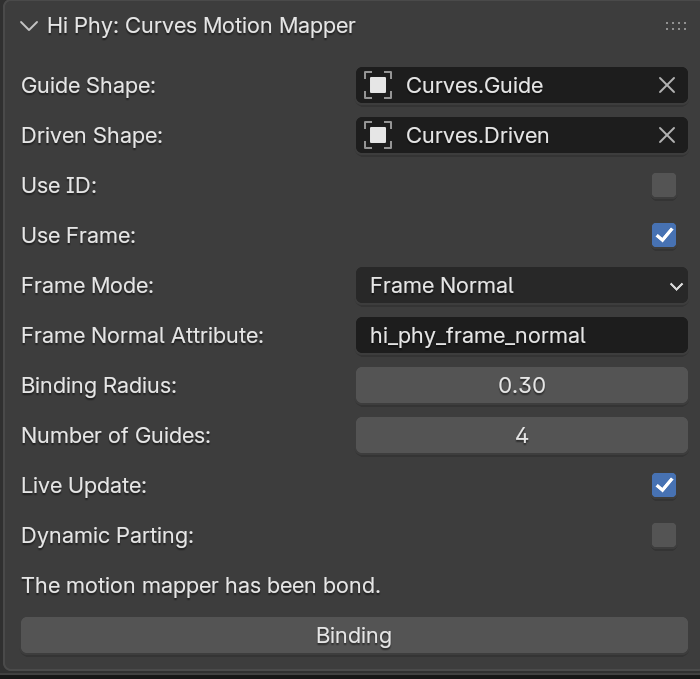
Properties#
| Property Name | Description |
|---|---|
| Guide Shape | Guide curves |
| Driven Shape | Driven curves to follow the guide motion |
| Use ID | Use an ID attribute to match guides |
| Use Frame | Use an curve frames to deform driven shape |
| Frame Mode | How to get the frame on the guide shape |
| Binding Radius | Radius for binding guide and driven curve (In guide curve space) |
| Number of Guides | Maximum number of guides that will be bond by each driven curve |
| Dynamic Parting | Allow hair to bundle towards the closest guide when the guides are too far away |
Binding Space
The binding happens in the guide curves space. So Binding Radius is also in the guide curves space. If there is a scaling factor of 100 of the guide curves, Binding Radius will be effectively divided by 100. If you are uncertain how the conversion works, you can always just make sure the scaling of the guide curves to be 1.
Use ID
The ID does not need to be unique. The idea is to define a group within the guide curves and the driven curves. When Use ID is checked, driven curves will only bind with guide curves that shares the same ID. ID attribute must be a per-curve attribute. Valid ID must be non-negative or -1. An ID of -1 means the driven curve/guide curve will be able to bind with any ID.
Use Frame and Frame Mode
Elastic Rod simulation contains frame information. The default attribute for storing the frame data from the simulation is hi_phy_frame_normal attribute. However, user can also set a twist attribute to twist the driven curves around the guide curves. An example for using the twist attribute can be find here.
Binding
Motion Mapper will only take effect after binding. The binding will considered failed, if any of the driven curve is unable to bind to any guide curves due to radius or ID. Binding data is currently not stored in the Blender scene, so every-time blender is opened, binding will need to be redone.
Here is an example of interpolated motion from two guides.
Simulated guides:
Interpolated curves:
Interpolated curves with dynamic parting:
The hair simulation with HiPhy curves motion mapper. Notice the chattering from the interpolation of motion is gone:
The old render with the Blender's interpolation system contains a lot of chattering.